Tuesday, March 12, 2013
Bagaimana Proses Hujan Asam?
Hujan Asam adalah istilah untuk hujan, salju,
atau hujan bercampur es dan salju atau presipitasi basah lain yang
tercemar oleh asam seperti asam sulfat dan asam nitrat.
Hujab asam membahayakan ribuan danau, sungai, dan anak sungai di seluruh dunia, membunuh ikan dan satwa liar yang lain. Hujan asam juga merusak bangunan, jembatan dan patung. Konsentrasi hujan asam yang tinggi dapat merusak hutan dan tanah.
Hujan asam terbentuk ketika air yang menguap dalam udara bereaksi dengan senyawa kimia tertentu. Senyawa ini, termasuk belerang dioksida dan nitrogen dioksida, terutama berasal dari pembakaran batu bara, bensin, dan minyak.
Sebagian besar kendaraan, pabrik dan pembangkit listrik membakar bahan bakar seperti itu untuk memperoleh energi.
Wilayah yang terkena dampak hujan asam meliputi daerah yang amat luas dari Amerika Utara bagian timur, Skandinavia (Eropa bagian utara), dan Eropa tengah dan beberapa bagian Asia. Sejak sekitar tahun 1950-1n, masalah ini meningkat di daerah pedesaan. hal ini terjadi karena cerobong asap yang lebih tinggi di daerah perkotaan membuat angin menerbangkan polutan menjauhi sumber polusi.
»» READMORE...
Hujab asam membahayakan ribuan danau, sungai, dan anak sungai di seluruh dunia, membunuh ikan dan satwa liar yang lain. Hujan asam juga merusak bangunan, jembatan dan patung. Konsentrasi hujan asam yang tinggi dapat merusak hutan dan tanah.
Hujan asam terbentuk ketika air yang menguap dalam udara bereaksi dengan senyawa kimia tertentu. Senyawa ini, termasuk belerang dioksida dan nitrogen dioksida, terutama berasal dari pembakaran batu bara, bensin, dan minyak.
Sebagian besar kendaraan, pabrik dan pembangkit listrik membakar bahan bakar seperti itu untuk memperoleh energi.
Wilayah yang terkena dampak hujan asam meliputi daerah yang amat luas dari Amerika Utara bagian timur, Skandinavia (Eropa bagian utara), dan Eropa tengah dan beberapa bagian Asia. Sejak sekitar tahun 1950-1n, masalah ini meningkat di daerah pedesaan. hal ini terjadi karena cerobong asap yang lebih tinggi di daerah perkotaan membuat angin menerbangkan polutan menjauhi sumber polusi.


Tuesday, March 5, 2013
BOT OPENGAMERS
Blue Crow


Halo gan, ane mau sewain bot buat create room murah.
hanya dengan 10ribu pulsa, anda udah bisa memakai bot ane selama 1 bulan. bandingkan dengan penyewaan bot dari OPGS. keren kan? cek ini
berikut penampakan bot dari ane

Paket saat ini
Bagi yg berminat silahkan langsung masuk channel "ONE" (tanpa tanda kutip) atau
hub :
Hp : 087798858060
YM :
ayo gan, kapan lagi bisa create room hanya dengan 10rbu pulsa :
»» READMORE...


Halo gan, ane mau sewain bot buat create room murah.
hanya dengan 10ribu pulsa, anda udah bisa memakai bot ane selama 1 bulan. bandingkan dengan penyewaan bot dari OPGS. keren kan? cek ini
Spoilerfor Spesifikasi:
berikut penampakan bot dari ane

Paket saat ini
Spoilerfor PAKET:
Bagi yg berminat silahkan langsung masuk channel "ONE" (tanpa tanda kutip) atau
hub :
Hp : 087798858060
YM :
ayo gan, kapan lagi bisa create room hanya dengan 10rbu pulsa :
Wednesday, February 27, 2013
Messenger Password Decryptor
|
||||||||||||||||||||||||||||||||||||||||
|
||||||||||||||||||||||||||||||||||||||||
| Features | ||||||||||||||||||||||||||||||||||||||||
| It supports recovery of stored
passwords from around 15+ popular messengers. Here is the complete list of the supported applications. | ||||||||||||||||||||||||||||||||||||||||
| ||||||||||||||||||||||||||||||||||||||||
| Here are the top features | ||||||||||||||||||||||||||||||||||||||||
|
||||||||||||||||||||||||||||||||||||||||
| How it Works? | ||||||||||||||||||||||||||||||||||||||||
Here are pointers on each
of these messengers exposing more technical details about how
they encrypt their login password, where it is stored and how we can
decrypt it manually to recover the password.
|
||||||||||||||||||||||||||||||||||||||||
|
||||||||||||||||||||||||||||||||||||||||
| Installation & Uninstallation | ||||||||||||||||||||||||||||||||||||||||
| It comes with simple Instaler that helps you to install it locally on your system for regular usage. It has intuitive setup wizard which guides you through series of steps in completion of installation. | ||||||||||||||||||||||||||||||||||||||||
| At any point of time, you can uninstall the product using the Uninstaller located at following location (by default) | ||||||||||||||||||||||||||||||||||||||||
| [Windows 32 bit] C:\Program Files\SecurityXploded\MessengerPasswordDecryptor [Windows 64 bit] C:\Program Files (x86)\SecurityXploded\MessengerPasswordDecryptor |
||||||||||||||||||||||||||||||||||||||||
| How to Use? | ||||||||||||||||||||||||||||||||||||||||
| Messenger Password Decryptor is easy to use with its simple GUI interface.
For advanced users & Penetration testers, it also comes with command
line interace. Here are the brief usage details for both GUI and command line version. |
||||||||||||||||||||||||||||||||||||||||
| Using GUI Version | ||||||||||||||||||||||||||||||||||||||||
|
||||||||||||||||||||||||||||||||||||||||
| Using Command-line Version | ||||||||||||||||||||||||||||||||||||||||
| Here is the typical usage of command line version | ||||||||||||||||||||||||||||||||||||||||
| MessengerPasswordDecryptor.exe "<output_file path>" | ||||||||||||||||||||||||||||||||||||||||
| Here are some of the examples | ||||||||||||||||||||||||||||||||||||||||
//Writes recovered password to text file in current directory MessengerPasswordDecryptor.exe output.txt //Writes recovered password to HTML file in current directory MessengerPasswordDecryptor.exe output.html //Writes recovered password to XML file in current directory MessengerPasswordDecryptor.exe output.xml //Writes recovered password to TEXT file MessengerPasswordDecryptor.exe "c:\my test\passlist" |
||||||||||||||||||||||||||||||||||||||||
| It automatically detects the mode (HTML/XML/TEXT) by using the extension of the specified file (html/xml/text). By default (or if no extension is specified) it uses the TEXT mode. For more examples refer to Screenshot 3 below. | ||||||||||||||||||||||||||||||||||||||||
| Screenshots | ||||||||||||||||||||||||||||||||||||||||
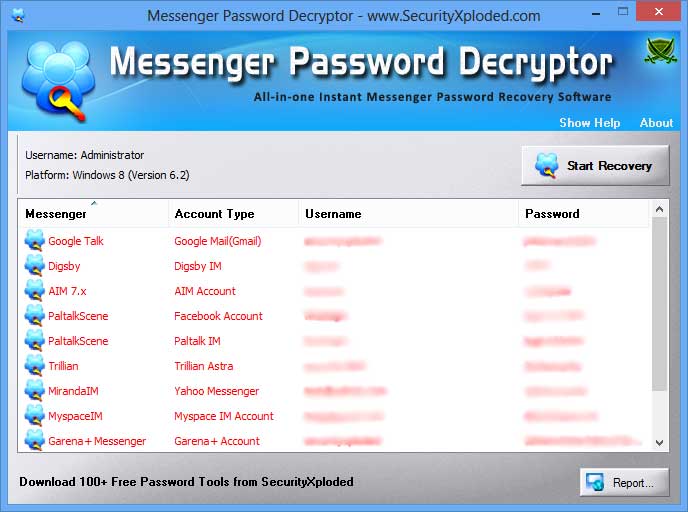
| Screenshot 1:MessengerPasswordDecryptor is showing the recovered passwords from popular Messenger. | ||||||||||||||||||||||||||||||||||||||||
 | ||||||||||||||||||||||||||||||||||||||||
| Screenshot 2: Command line usage of MessengerPasswordDecryptor showing various examples. | ||||||||||||||||||||||||||||||||||||||||
 | ||||||||||||||||||||||||||||||||||||||||
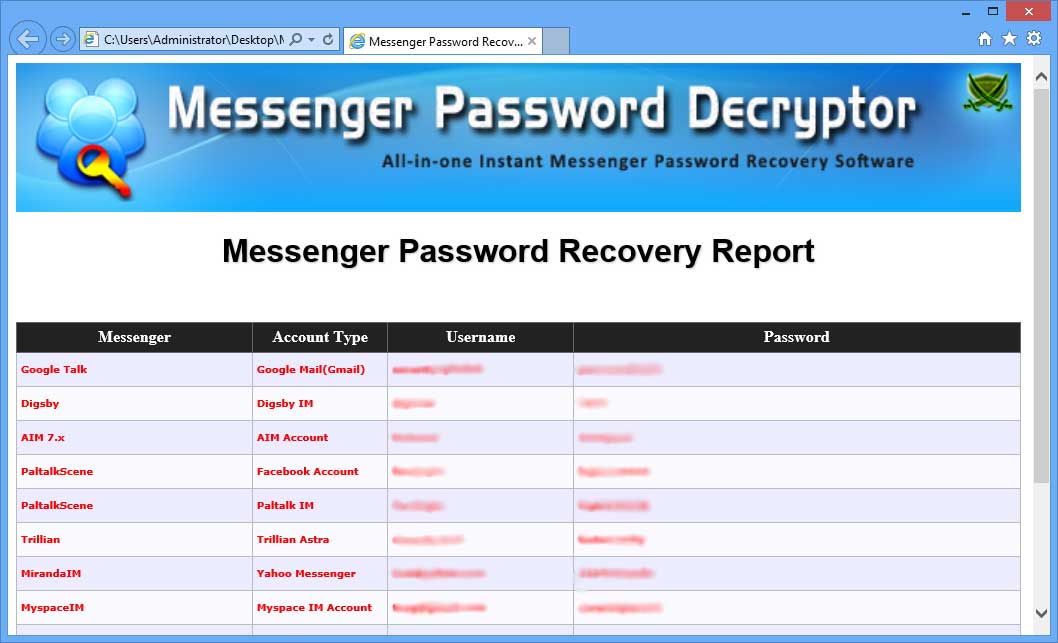
| Screenshot 3: Exported list of of recovered Messenger passwords by MessengerPasswordDecryptor in HTML format. | ||||||||||||||||||||||||||||||||||||||||
 |
||||||||||||||||||||||||||||||||||||||||
| Release History | ||||||||||||||||||||||||||||||||||||||||
| ||||||||||||||||||||||||||||||||||||||||
| Disclaimer | ||||||||||||||||||||||||||||||||||||||||
| MessengerPasswordDecryptor is designed for good purpose to help
users to recover the lost passwords from Messenger. Like any tool its use either good or
bad, depends upon the user who uses it. However author is not
responsible for any damage caused due to misuse of this tool. Read complete License & Disclaimer terms here. |
||||||||||||||||||||||||||||||||||||||||
| Download | ||||||||||||||||||||||||||||||||||||||||
|
||||||||||||||||||||||||||||||||||||||||

Astrix Paswaord
|
|||||||||||||
|
It's user friendly interface can help you to easily
find the passwords from any Windows based application.You can simply
drag the 'search icon' to any password box to find the
real password hidden by those asterisks. Most applications do not display real password in the login box for security reasons and instead they show the asterisks (****). But often there is need to know the actual password especially if you have forgotten password that you have entered while ago. In such cases, AsteriskPasswordSpy will help you to easily find out the real password hidden behind asterisks. It works on wide range of platforms starting from Windows XP to latest operating system Windows 8. |
|||||||||||||
| Features | |||||||||||||
|
|||||||||||||
| Installation & Uninstallation | |||||||||||||
| AsteriskPasswordSpy comes with Installer so that you can install it locally on your system for regular usage. It has intuitive setup wizard which guides you through series of steps in completion of installation. | |||||||||||||
| At any point of time, you can uninstall the product using the Uninstaller located at following location (by default) | |||||||||||||
| [Windows 32 bit] C:\Program Files\SecurityXploded\AsteriskPasswordSpy [Windows 64 bit] C:\Program Files (x86)\SecurityXploded\AsteriskPasswordSpy |
|||||||||||||
| How to Use? | |||||||||||||
|
AsteriskPasswordSpy is easy to use with its simple GUI interface. Here are the brief usage details |
|||||||||||||
|
|||||||||||||
| Screenshots | |||||||||||||
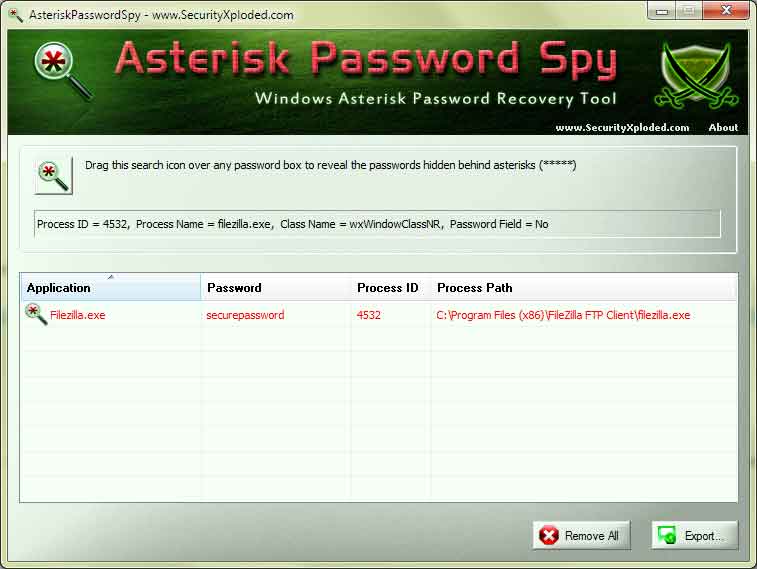
| Screenshot 1:Asterisk Password Spy is showing all the recovered passwords from password boxes of various Windows applications. | |||||||||||||
 | |||||||||||||
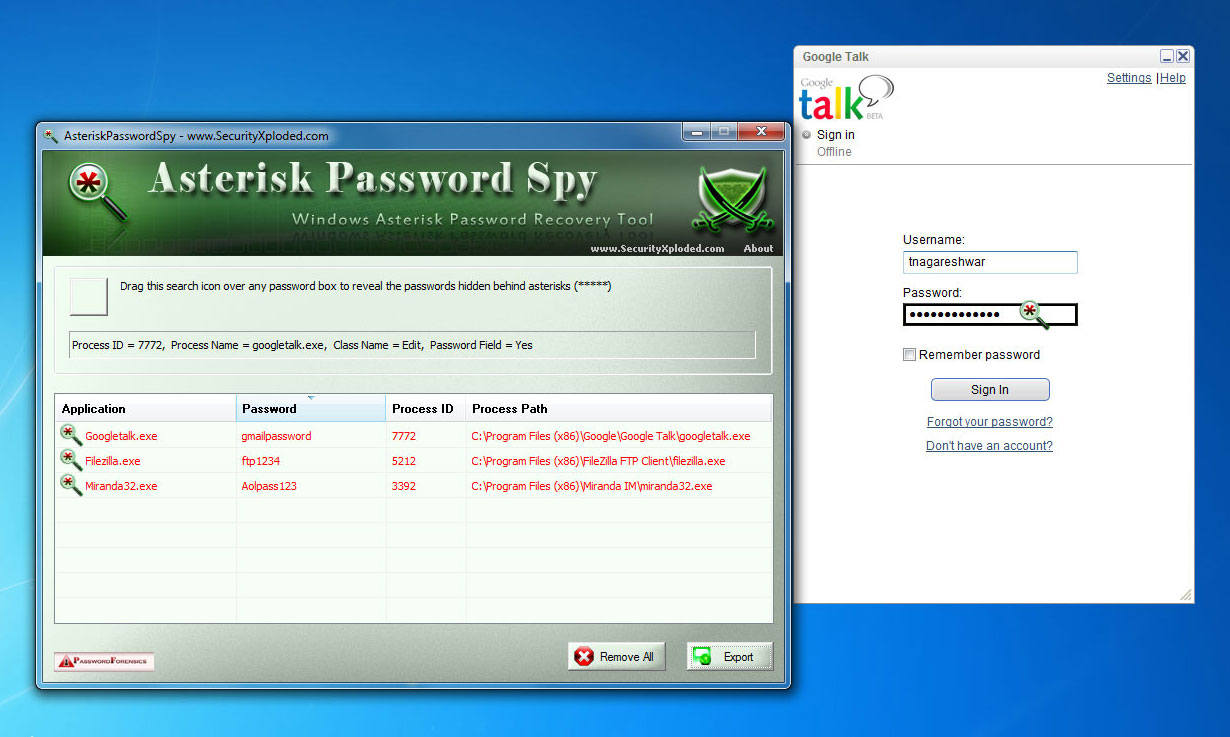
| Screenshot 2: Asterisk Password Spy is trying to get the password from Google Talk login box | |||||||||||||
 | |||||||||||||
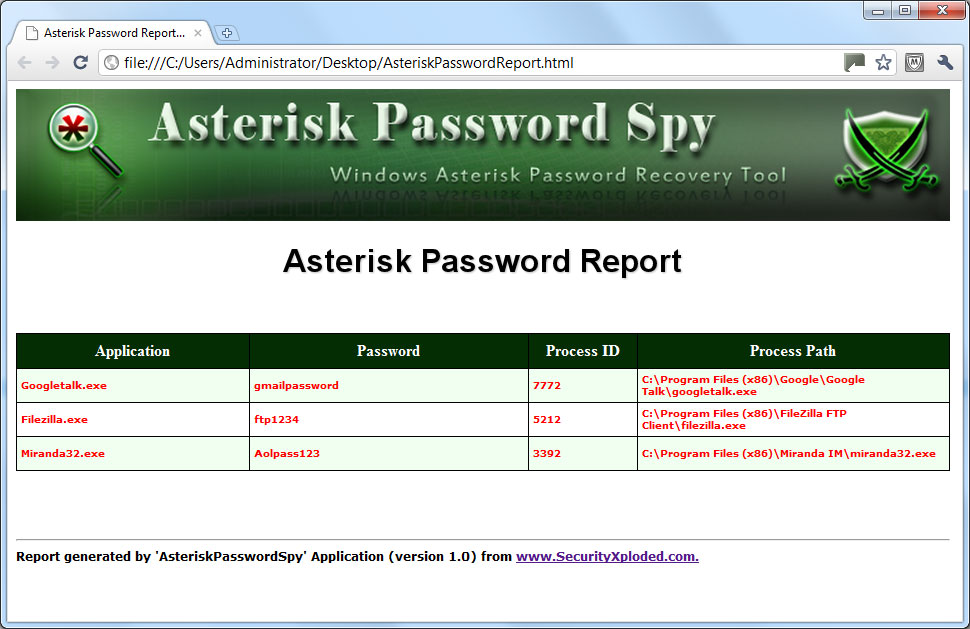
| Screenshot 3: Exported list of of recovered passwords by AsteriskPasswordSpy in HTML format. | |||||||||||||
 |
|||||||||||||
| Known Limitations | |||||||||||||
|
|||||||||||||
| Release History | |||||||||||||
| |||||||||||||
| Acknowledgements | |||||||||||||
| I want to covey my special thanks to authors Brian Friesen of "Password Spy" [Reference 1] & Zhefu Zhang of "Password Spy++" [Reference 2] projects. This tool is based on their impressive work. | |||||||||||||
| Disclaimer | |||||||||||||
| AsteriskPasswordSpy is not a hacking tool as it can recover only
your stored passwords. It cannot recover the passwords for other users
unless you have right credentials. Like any tool its use either good or bad, depends upon the user who uses it. However Author or SecurityXploded is not responsible for any damage caused due to misuse of this tool. Read complete License & Disclaimer terms here. |
|||||||||||||
| Download | |||||||||||||
|
|||||||||||||


Subscribe to:
Posts (Atom)


